
Console guide
PS5 liquid metal: why we recommend a clean and a fresh application
How the PS5's liquid metal oxidizes and dust builds up, the signs to watch for, and why we recommend a clean and fresh liquid metal for a PS5 running hot.
In this guide10 sections · 9 min read
- What the liquid metal is, and why Sony used it
- Which PlayStations have liquid metal
- How liquid metal oxidizes and wears
- Does standing the PS5 upright matter?
- Dust: the other half of the problem
- Signs a PS5 needs attention
- Why this isn’t a home repair
- What we do, and when we recommend it
- Common questions
- Before you book
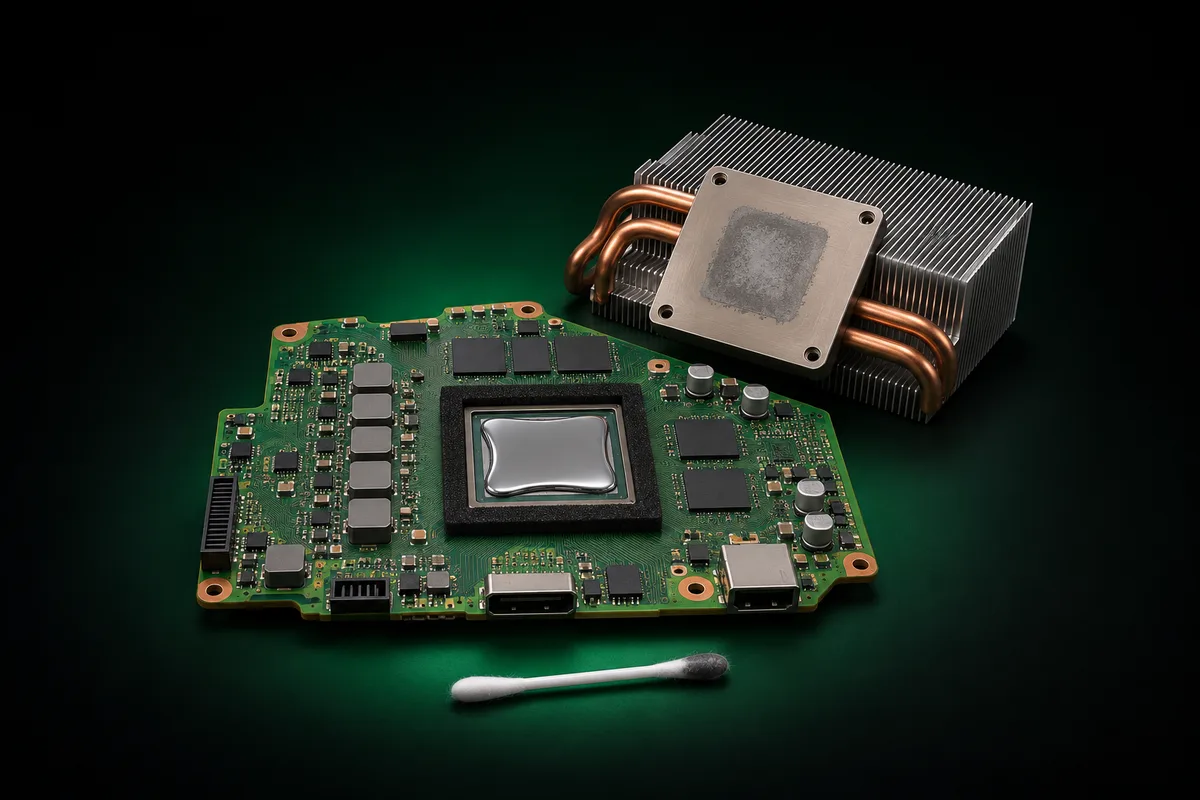
A PS5 doesn’t cool its main chip the way most consoles do. Instead of thermal paste, Sony put a thin layer of liquid metal between the chip and the heatsink. It moves heat very well, and it’s also the part of the cooling system that can quietly change over the years, along with the dust that collects in every console. This guide explains what happens to both, how to tell when it matters, and why a clean and a fresh application of liquid metal is the service we recommend for a PS5 that has started running hot.
What the liquid metal is, and why Sony used it
Every console has a thermal layer between its main chip and its heatsink. Its job is to fill the microscopic gaps between the two surfaces so heat can cross from one to the other. In a PS4 that layer is ordinary thermal paste. In a PS5 it’s a metal alloy based on gallium that stays liquid at room temperature. Sony hasn’t published the exact recipe.
Sony’s reason is heat. The PS5’s chip is small for the power it uses, so a lot of heat leaves through a small area. Sony’s engineers say liquid metal carries heat far better than conventional materials, that they tested it for safety, and that keeping it insulated from the rest of the console was a major part of the design work (PS5 Pro teardown, PlayStation Blog). In practice that means a foam barrier around the chip that holds the liquid in place. iFixit’s repair guide warns never to remove that barrier (How to Apply Liquid Metal in a PlayStation 5).
Which PlayStations have liquid metal
Every PS5 generation does. Sony says the original PS5 introduced it and that later models kept it, the PS5 Pro included (same PlayStation Blog post). iFixit publishes separate liquid metal guides for the original PS5, the slim model and the Pro.
The design has changed along the way. On the PS5 Pro, Sony added fine grooves to the heatsink surface where the liquid metal sits, and says they make cooling more stable. Sony doesn’t say more than that; repair technicians read the grooves as a way of holding the liquid in place.
The PS4 and PS4 Pro use ordinary thermal paste. They still collect dust and their paste still wears out, but nothing in this guide about liquid metal applies to them. Our console overheating guide covers every console.
How liquid metal oxidizes and wears
Liquid metal doesn’t dry out the way paste does, because there’s nothing in it to evaporate. What changes it is chemistry and movement.
Oxidation. Gallium reacts with oxygen. Wherever the alloy meets air it forms a thin, dull oxide skin, and over years of heating up and cooling down more of the bright liquid can turn into grey, pasty or crusty material. Oxide doesn’t wet the surfaces or carry heat the way clean liquid metal does. iFixit describes oxidized liquid metal as looking “dried-out or cracked”, and says it has to be cleaned off and replaced rather than spread around again (iFixit’s guide).
Uneven spread. The layer only works where it covers the chip. The same guide notes that liquid metal can end up spread unevenly over time, leaving part of the chip with little or nothing between it and the heatsink. A bare patch is a hot spot.
Reaction with the heatsink. Gallium slowly reacts with many metals. Technicians who have opened PS5s describe a nickel-plated copper plate where the heatsink meets the chip, and the plating matters: Gamers Nexus’s corrosion test found that liquid metal stains bare copper permanently, and that nickel acts as a barrier (How liquid metal affects copper, nickel and aluminum). The barrier isn’t always perfect. One repair technician documented a PS5 where the alloy had worked through the plating and left a hardened crust on the copper underneath, and that console was overheating badly (TweakTown’s report). A heatsink damaged like that isn’t fixed by fresh liquid metal alone.
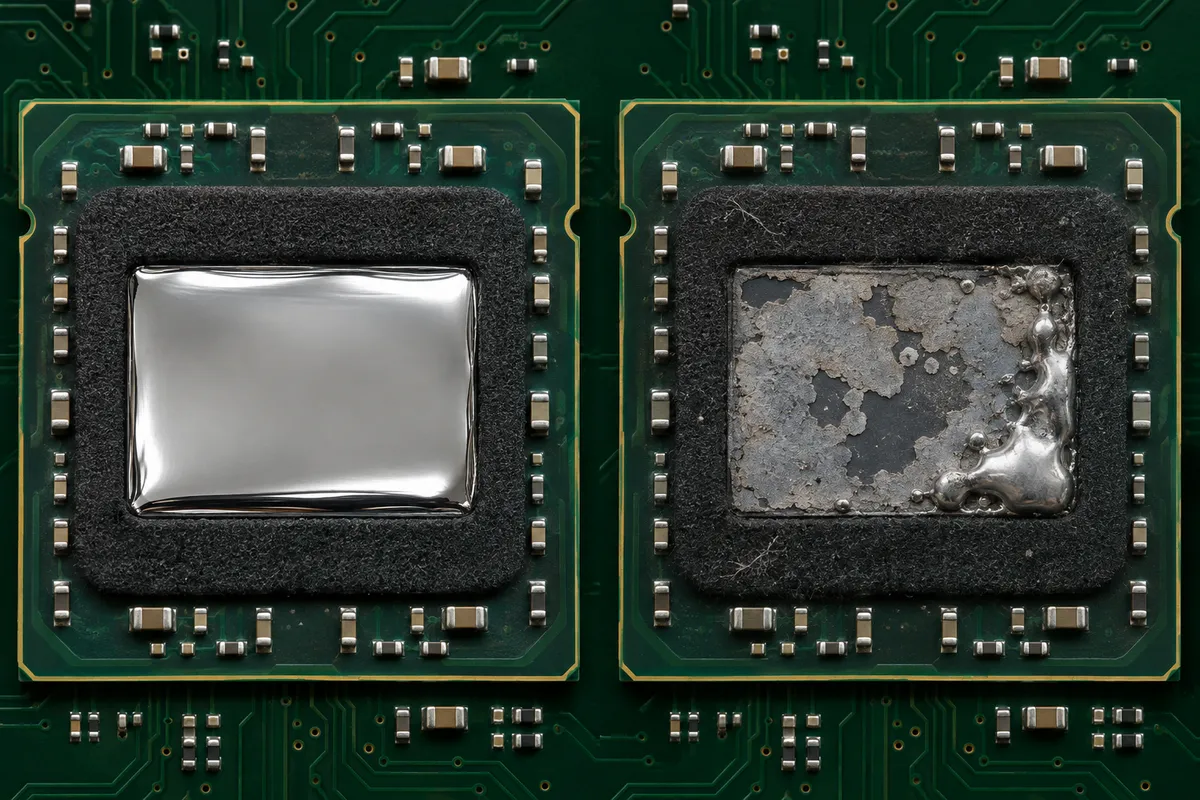
How common is this? Nobody has published a rate. The evidence is what repair technicians find when they open consoles, and plenty of PS5s run for years without trouble. So we treat it as something to check when a console shows the signs below, not something every PS5 needs on a schedule.
Does standing the PS5 upright matter?
You may have read that a PS5 stood on its end will leak its liquid metal. That started in January 2023, when a repair shop posted photos of liquid metal that had escaped the barrier. Coverage at the time called the claim unverified and the sample small (Push Square), and one of the technicians quoted later said his point had been misreported and the problem was less widespread than the headlines suggested (Wccftech).
Where that leaves it:
- Sony designed the PS5 to be used both ways and hasn’t said that either one is a risk.
- iFixit’s guides say problems are more likely in a console that has stood upright for long periods. That’s the experience of people who open a lot of consoles, not a measured result.
- The grooves Sony added to the PS5 Pro suggest it wanted the liquid metal held in place more firmly, though Sony hasn’t said it was fixing a fault.
Our reading: it’s debated, and there’s no reason to panic or to lay a healthy console flat. If a PS5 is overheating, its orientation is worth mentioning when you book. It isn’t a diagnosis.
Dust: the other half of the problem
Liquid metal gets the heat into the heatsink. Air has to take it away from there, and that’s where dust comes in. A PS5’s fan pulls room air through the console constantly, and dust, lint and pet hair come with it. They collect on the fan blades, in the vents, and most of all between the heatsink’s thin metal fins, where a felt-like mat can build up and block the airflow.
Sony’s advice covers the outside of the console: keep the vents clear, leave at least 10 cm of space on each side, keep it off long-fibre carpet and out of cramped spaces, and with the power cable unplugged, use a low-powered vacuum on the vents (PS5 console is making noise). That’s worth doing and costs nothing. It doesn’t reach the heatsink fins deep inside the console, and it does nothing for the liquid metal.
The two problems feed each other. A clogged heatsink makes the chip run hotter, the fan spins faster and pulls in more dust, and the thermal layer spends its life at higher temperatures.
Signs a PS5 needs attention
- The fan is louder than it used to be, in the same games, in the same spot. Sony says a louder fan in demanding games is normal on its own, so the change over time is what matters.
- An on-screen warning that the console is too hot.
- Shutting itself off during play, especially if it happens sooner each time.
- Stutter, slowdowns or crashes after the console has been running a while. iFixit lists overheating, throttling and poor performance as symptoms of a liquid metal problem, and notes that a dirty or failing fan can cause the same ones.
None of these proves the liquid metal is at fault. A failing fan, a blocked vent or a power fault can look the same from the sofa, which is why a diagnostic comes before any work.
Why this isn’t a home repair
We’re glad to tell people when a job is easy to do themselves. This isn’t one of those.
- Liquid metal conducts electricity. A stray droplet on the board can short components. Paste is far more forgiving.
- Gallium attacks aluminium. It makes the metal brittle, and a console has aluminium parts inside it. Thermal Grizzly, which makes the liquid metal many repairers use, says its product must never touch aluminium and describes it as a product for experienced users (Conductonaut product page).
- The old material has to come off completely. Oxidized liquid metal has to be cleaned from both surfaces, without spreading it past the barrier, before anything new goes on.
- The barrier has to seal again. iFixit’s guide warns that the foam must stay intact, that replacement thermal pads have to match the original thickness or the foam may not seal, and that the screws holding the heatsink must be loosened evenly or the chip can be damaged.
- Paste isn’t a straight swap. The PS5’s cooling was designed around liquid metal, so putting paste there instead usually means giving up some cooling.
- It’s a full teardown. Reaching the chip means taking the console apart down to the board.
What we do, and when we recommend it
On a PS5, our overheating service is a full teardown. We clear the dust from the fan, the heatsink fins and the vents, clean the old liquid metal off the chip and the heatsink, check the barrier and the heatsink surface, and apply fresh liquid metal before putting the console back together and testing it.
We recommend it when:
- a PS5 shows the signs above and still does after you’ve given it room and cleaned the outside vents;
- a console has lived somewhere dusty, or with pets or smoke, and is clearly louder than when it was new.
We don’t recommend it for a PS5 that’s quiet and stable. If the diagnostic finds a different fault, such as a failing fan or a damaged heatsink, we tell you what it found and quote for that before any work starts.
It’s bench work, so it isn’t done at your door. In New Jersey a visit can handle the handover, and from anywhere else in the US you can mail the console in.
Common questions
How often should a PS5’s liquid metal be replaced?
There’s no set interval. Sony doesn’t publish one, iFixit’s guides don’t give one, and Thermal Grizzly says there’s no fixed interval for its liquid metal. Go by symptoms: rising fan noise, heat warnings or shutdowns that continue once dust and ventilation are ruled out.
Can I use thermal paste instead?
It will work after a fashion, but the PS5 was designed around liquid metal and paste doesn’t move heat as well. We put liquid metal back.
Will cleaning the vents myself help?
It can, and it’s the right first step. Follow Sony’s method above. If the console is still loud or still shutting down afterwards, the cause is deeper inside.
My PS5 stands upright. Should I lay it flat?
There’s no solid evidence that you need to. Use it in whichever position gives it the most open space around the vents.
Does a PS4 need this?
A PS4 has thermal paste, not liquid metal. It can still overheat from dust and worn paste; see console overheating repair.
Before you book
If the console shuts down within minutes of starting, stop using it until it’s been looked at. When you book, tell us:
- the exact PS5 model;
- what you notice, and how long the console runs before it happens;
- where it sits, how much room it has, and whether it stands upright or lies flat;
- whether it has been opened or repaired before.
Diagnostics are $50, credited toward the repair. See console overheating repair for each console’s price, PlayStation repair for everything else we do on a PS5, and PS5 repair prices for the full list.
What it costs here
Overheating service: the lowest and highest price across the models we list, by brand.
| Brand | Clean & Repaste |
|---|---|
| Xbox | $79–$99 |
| PlayStation | $89–$129 |
| Nintendo | $79–$89 |
Every model's exact price: Console overheating repair
$50 repair diagnostics, credited toward your repair, and we come to you anywhere in New Jersey.